
The Top-Selling Products report ranks every paid line item sold during the selected date range by either quantity sold or net revenue. It's the answer to two evergreen merchant questions: what's flying off my shelf? and what's making me the most money?
Access path: Quickvee Web → Reporting → Sales Reports → select Top-Selling Products
-20261027-094233.jpg?cb=735965ba090b46350cc2190aaee5ca5b)
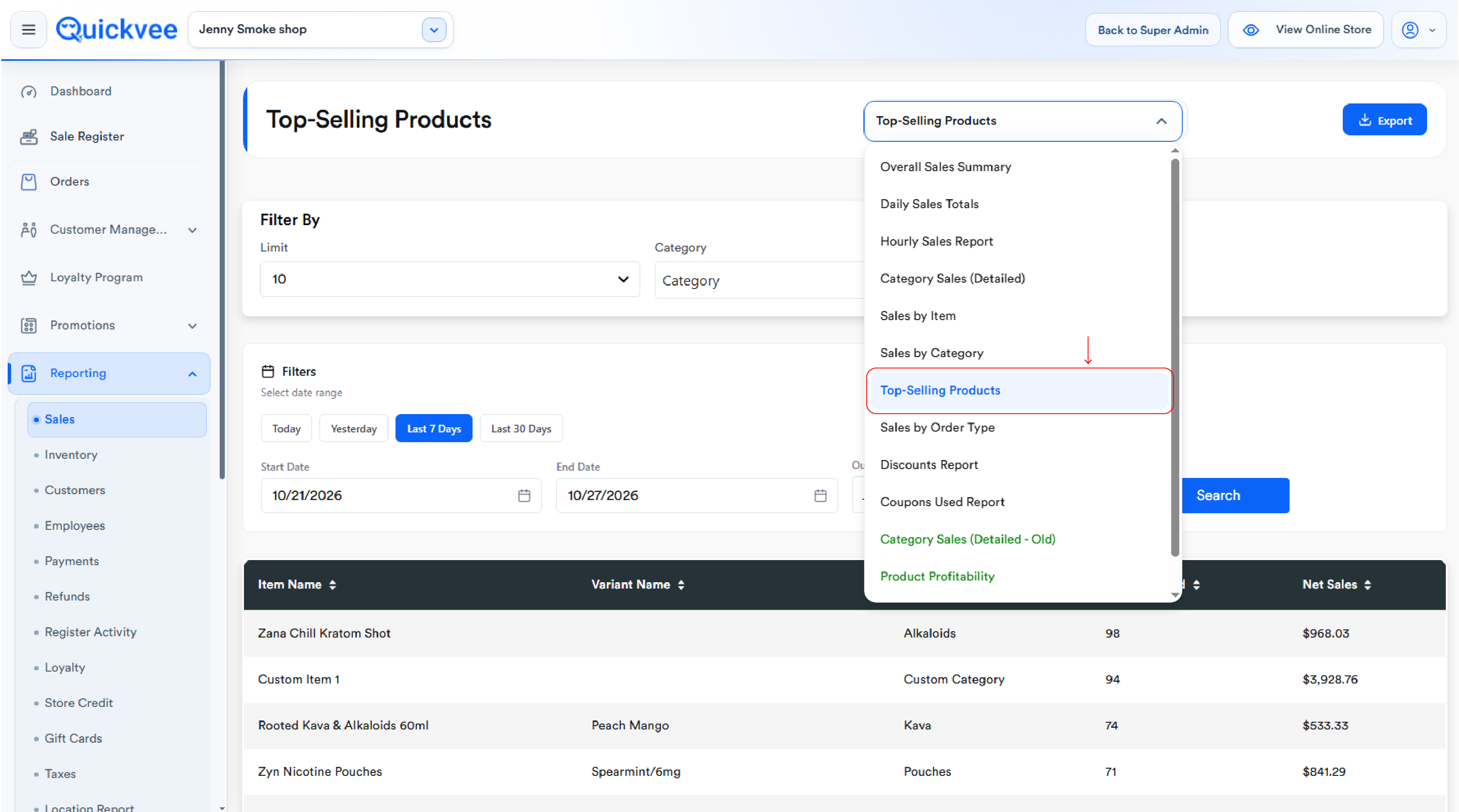
The report shows item name, variant, category, quantity sold, and net sales — sortable on every column so the merchant can flip between the two views with one tap.
The filter bar
-20261027-094344.jpg?cb=c2b35415a24198ec29e2cbafdd592ef7)
Limit
The Limit dropdown controls how many top-ranked products the table returns. Default is 10. Pick a smaller number for a quick top-5 scan or a larger number to surface mid-tier products. Use a higher limit when investigating long-tail sales or planning a category-wide reorder.
Category
The Category dropdown narrows the report to a single category. Default returns top sellers across every category. Selecting a specific category — Disposables or Pouches — returns top sellers within that category, useful for like-for-like comparison.
Date range
-
Quick filters — Today, Yesterday, Last 7 Days, Last 30 Days
-
Manual — Start Date / End Date pickers for any custom range
Outlet
For multi-store accounts, the Outlet dropdown selects which store. Each outlet's report runs independently — to find best sellers across all locations at once, run per outlet and consolidate the exports.
Search & Export
-
Search — applies filters and reloads the table
-
Export Report — downloads the filtered table for sharing or Excel
Reading the table
|
Column |
What it shows |
|---|---|
|
Item Name |
The parent product name as it appears in the catalog |
|
Variant Name |
The specific variant sold (e.g. Wintergreen/6mg, Cool Watermelon Strong 11mg). One row per variant |
|
Category |
The category assigned to the product. Custom items appear under their assigned custom category |
|
Quantity Sold |
Total units sold in the range across all paid orders. Refunds reduce this count |
|
Net Sales |
Total dollar value of sales of this variant, net of refunds |
-20261027-094542.jpg?cb=0e42772e06c5ec0501acd40cbf07006a)
Sort by Quantity vs. Sort by Revenue
The two main views — toggle with a single tap on the relevant column header.
Quantity Sold (descending) — answers "What is my highest-velocity product?" Surfaces fast-movers and cheap impulse items — products that disappear off the shelf even though the per-unit revenue is small. Reorder priority items show up here.
Net Sales (descending) — answers "What is my highest-revenue product?" Surfaces premium and high-ticket items that sell in lower quantities but contribute the most to revenue.
The same product can rank very differently on the two views. Wild Berry Incense Large 11in may top Quantity Sold at 68 units but contribute only $21.86 in revenue — a high-velocity, low-ticket item. Custom Item 1 may show 41 units but $2,750 in revenue — far fewer transactions but vastly more dollar value per sale. The view you sort by depends on what decision you're making.
Common workflows
"What did I sell the most of yesterday?"
Quick filter → Yesterday → Search. Sort by Quantity Sold descending (default). The top row is your single best-moving item.
"Which products earn me the most money?"
Quick filter → Last 30 Days → Search. Sort by Net Sales descending. Top rows are your revenue contributors — items to never run out of.
"What sells best in the Disposables category?"
Set Category → Disposables → Last 30 Days → Search. Table now shows only Disposables, ranked by Quantity Sold. Useful for category-specific reordering or vendor reviews.
"Show me my top 25 instead of top 10"
Change Limit → 25 → Search. Useful when you want to see mid-pack items that didn't make the top-10 cut.
"Spot fast-volume / low-revenue items"
Sort by Quantity Sold descending, scan Net Sales for relatively small dollar values. Big quantity + small dollars = a cheap high-velocity item, possibly priced too low.
"Spot slow-volume / high-revenue items"
Sort by Net Sales descending, scan Quantity Sold for relatively low counts. Few units + big dollars = premium products. Set inventory deep enough so a single sellout doesn't punch a hole in revenue.
"Find which variant of a product sells best"
Find the parent product across the table — its variants appear as separate rows. Compare quantity and net sales across variants to see which flavor, size, or spec is doing the heavy lifting.
Important notes
Only paid orders are included. Held orders eventually paid are included; held orders abandoned are not.
Refunds reduce both quantity and net sales. A full refund of an order with 2 units of a product reduces both Quantity Sold by 2 and Net Sales by the refunded amount.
Variants are listed separately. A parent product with three flavors appears as three rows. To roll up to the parent, use the Sales by Item report or sum after export.
Custom items appear with their custom category. Items keyed in at the register as Custom Items appear with an empty Variant Name and their assigned Custom Category. They contribute fully to the rankings.
Filters do not auto-apply. Changing Limit, Category, dates, or Outlet requires tapping Search.
The report focuses on what was sold, not what's left. For on-hand inventory, current stock levels, or reorder triggers, use the Inventory module.
Net Sales is net of refunds and item-level discounts. For discount-aware revenue analysis, cross-reference with the Discounts Report; for category-aware revenue, use Sales by Category.
Calculation reference
|
Field |
Formula |
|---|---|
|
Quantity Sold |
|
|
Net Sales |
|
|
Product Name |
If |
|
Category Name |
If category title is NULL/empty OR item name contains "custom item" → Custom Category; else |
Data is grouped by product_id, variant_id, variant, product title, item name, category. Sorted by total_sold DESC. Default limit is 10. Gift cards are excluded.