
Drop Cash records cash physically removed from the register drawer for cash-management reasons — typically a mid-shift bank deposit, a transfer to the safe, or moving large bills out of the till to keep the drawer at a manageable level.
It's a cash-out event with no vendor and no sale attached. The cash leaves your custody on the register; the system deducts the amount from your expected cash and logs the action with a reason.
What Drop Cash is for
-
Mid-shift safe drops — moving accumulated cash to a safe so the drawer doesn't get too full or too tempting
-
Bank deposits — removing cash from the drawer to take to the bank
-
Drawer balancing — pulling out large bills (like fives or tens of $100s that built up) so you have room to make change
It's not for paying a vendor, paying a customer back for a refund, or any sale-related cash movement. Use Vendor Payout for vendors and the regular refund flow for customer refunds.
Where to find it: From the POS register, tap the three-dot menu at the top-right → Drop Cash.
Step 1 — Enter the drop amount
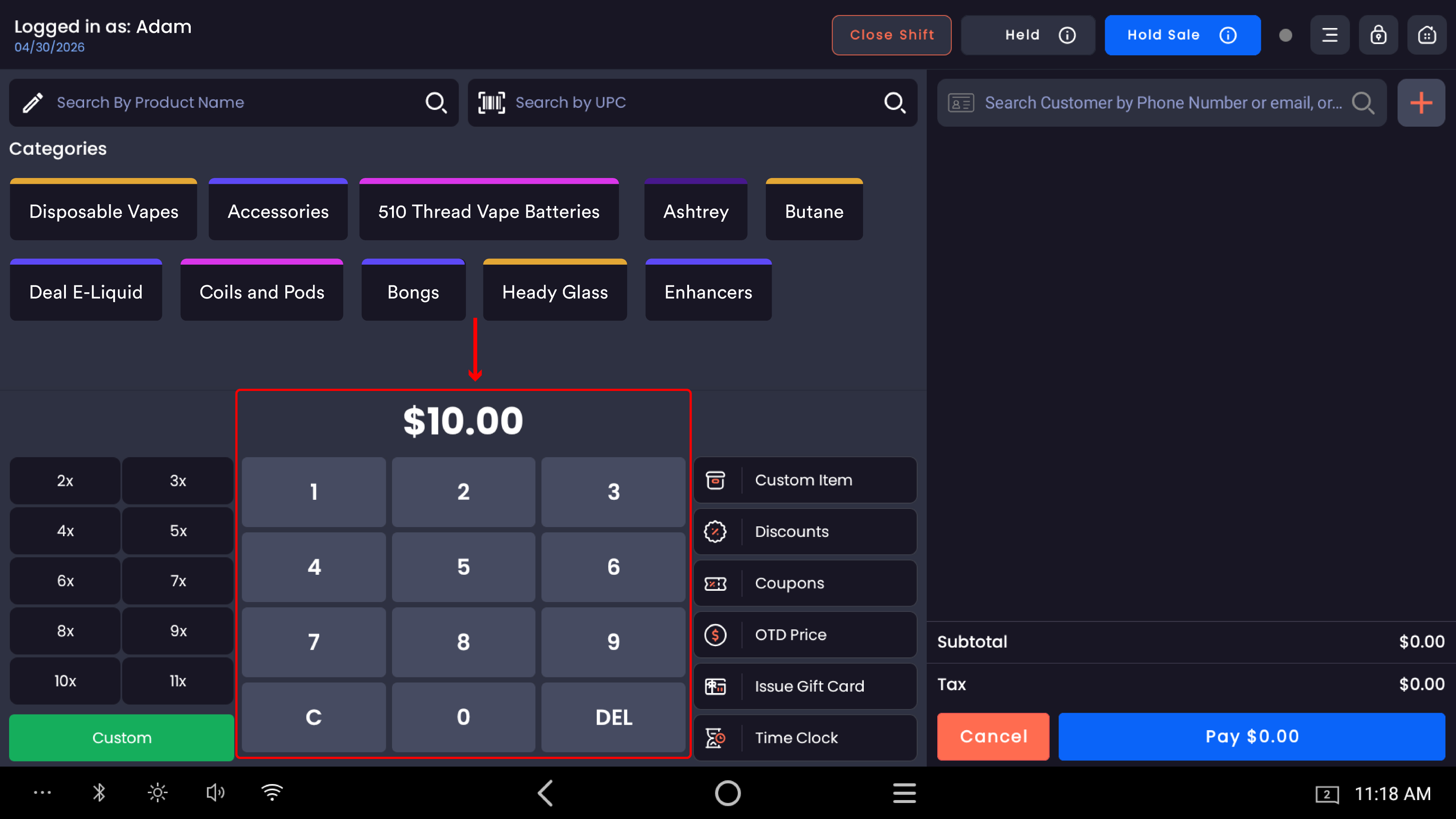
Type the amount you're removing from the drawer using the on-screen keypad.
|
Keypad button |
What it does |
|---|---|
|
0–9 |
Adds a digit. Cents fill from the right. |
|
DEL |
Deletes the last digit. |
|
C |
Clears the entire amount. |
The amount formats from right to left in cents. For $150.00, type 1, 5, 0, 0, 0.
Count the cash before you type. Lay it out, count it twice, then enter the total. A typo here creates a real cash discrepancy at Close Shift.
Step 2 — Open the three-dot menu
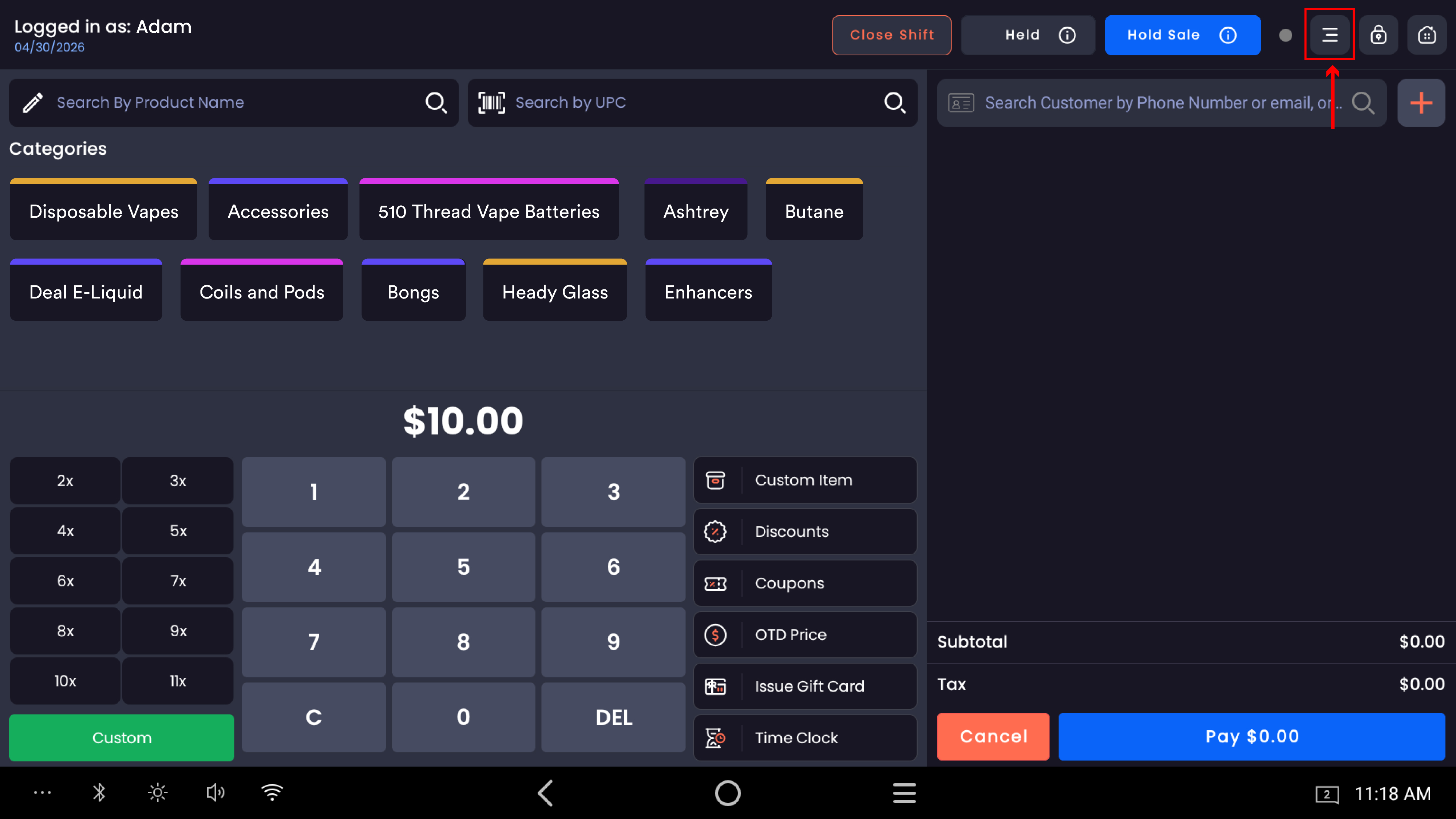
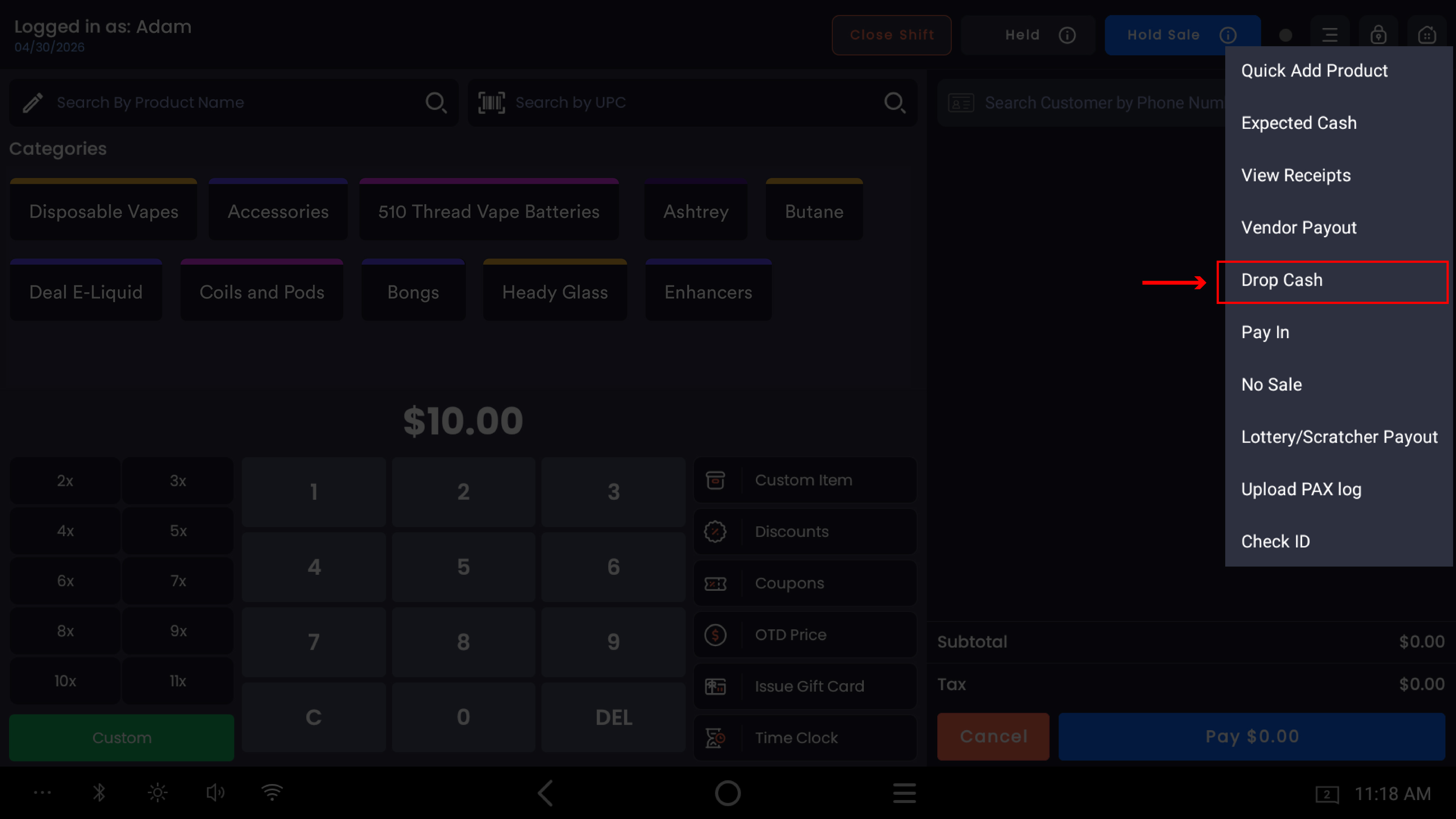
Tap the three-dot icon at the top-right of the register screen. The dropdown shows options including Drop Cash. Tap Drop Cash.
Step 3 — Add a reason and confirm
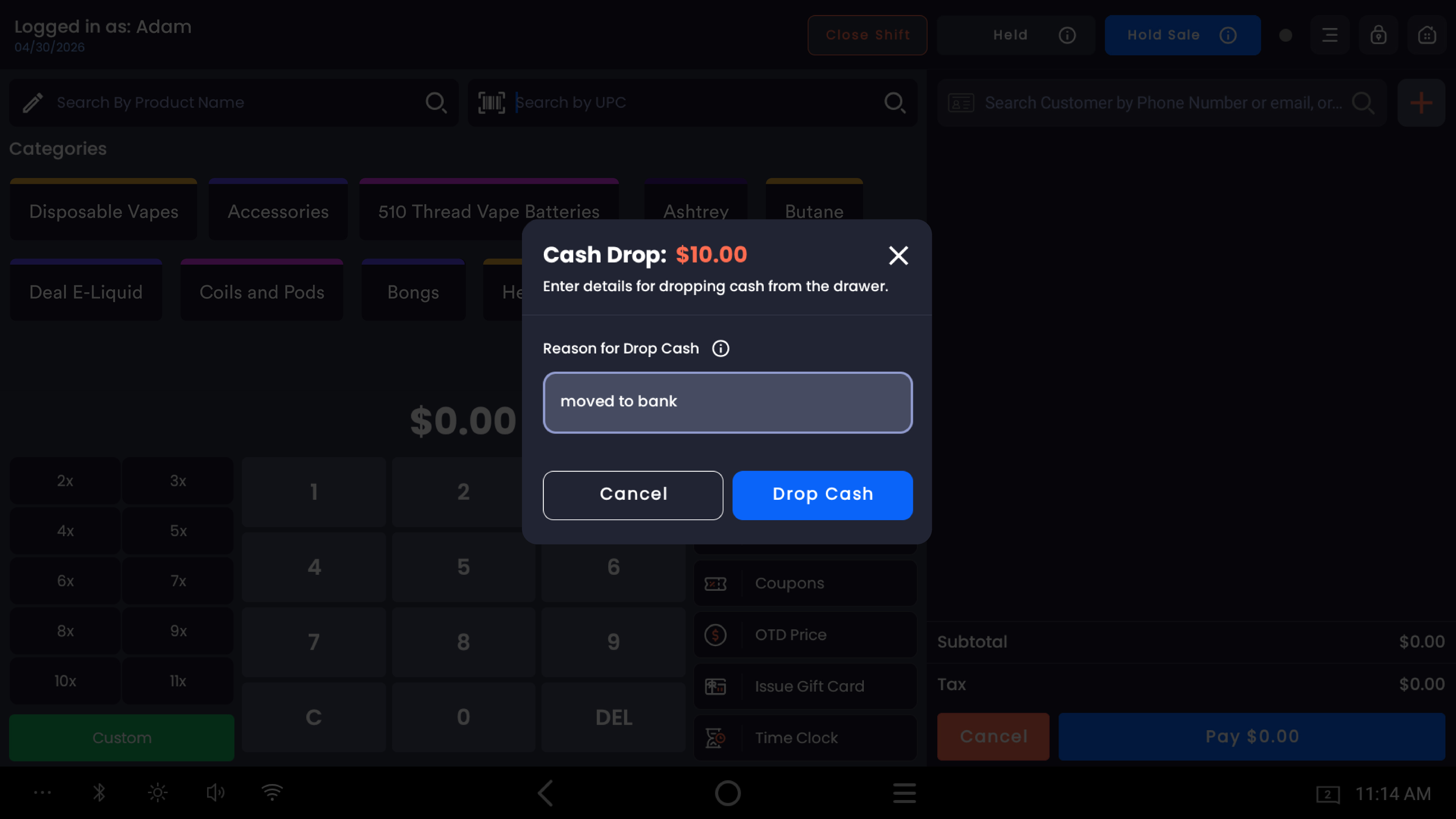
The Cash Drop modal opens. The header shows:
-
Cash Drop: the amount in red (e.g.
$150.00) -
"Enter details for dropping cash from the drawer."
Reason for Drop Cash
A required text field labeled Reason for Drop Cash asks you to explain why. Common reasons:
-
Moved to bank -
Mid-shift drop to safe -
Removed large bills — too much $100 -
End-of-shift partial deposit -
Manager pickup(with manager name)
Be specific. "Drop" or "deposit" alone isn't enough — when reconciling weeks later, you want to know exactly what happened to that cash.
The reason becomes part of the audit trail. It appears in the Register Activity Report and on the Drop Cash report. A vague reason makes future reconciliation harder; a specific reason can settle disputes about missing cash.
Confirm
Tap Drop Cash to commit. The cash drawer opens automatically so you can physically remove the cash. Tap Cancel to abandon — nothing is recorded and no cash is logged as removed.
What gets recorded
|
Where |
What appears |
|---|---|
|
Register Activity Report (web backend → Reporting → Register Activity) |
A |
|
Drop Cash Report (web backend) |
All Drop Cash events for the date range, exportable to CSV for accounting |
|
Expected Cash for the shift |
The drop amount is subtracted from Expected Cash. At Close Shift, your drawer should be short by the dropped amount, and that's expected — not a variance. |
Permissions
Drop Cash is permission-gated in the web backend under Employees → Permissions. Without the permission, the option doesn't appear in the three-dot menu.
-20260527-090139.jpg?cb=396c59ce596bc47b2cbe05ed95466dfa)
This is a high-trust action — cash leaves the register with no offsetting sale or vendor. Limit the permission to managers and trusted senior staff.
Common questions
I dropped cash twice by mistake — how do I delete the duplicate? You can't delete a Drop Cash entry from the POS, and the web backend doesn't allow merchant-side deletion either. Contact support with: store name, merchant ID, date and time of the duplicate, both Drop Cash entries. Support can remove the duplicate.
I dropped the wrong amount — typed $150 but only removed $100. Don't try to fix it by physically adjusting the drawer. If you under-removed (typed more than you took): run a Pay In for the difference with a correction note. If you over-removed (typed less than you took): run another Drop Cash for the missing amount.
Does Drop Cash require a printed slip? No. The system doesn't auto-print a slip. If your store's internal procedure requires one, generate it from the Register Activity Report.
The drawer didn't open after I tapped Drop Cash. Check that the cash drawer is connected and powered. The Drop Cash event is still recorded; just open the drawer manually.
What's the difference between Drop Cash and Vendor Payout? Both remove cash and reduce Expected Cash. Vendor Payout → cash goes to a specific vendor, requires vendor selection. Drop Cash → cash goes to safe/bank, no vendor, only requires a reason.
What's the difference between Drop Cash and Pay In? Opposite directions. Drop Cash removes cash from the drawer; Pay In adds cash to the drawer.
Should I do one big drop at end of shift, or multiple small drops during the day? Operationally, smaller drops more often = less cash sitting in the drawer = less risk. Many merchants drop every $500 or $1,000 of cash sales.
Does Drop Cash count as a sale or affect my sales totals? No. Sales Summary, Net Sales, Gross Sales, and tax reports are unaffected.
Can I drop cash mid-transaction? Best practice is to finish or hold the customer's transaction first. Use Hold Sale if you need to interrupt for a manager-required drop.